During the public beta, Pro is included for everyone, free, and there is nothing to buy or manage. This is for later, when you want to move between plans or change your billing interval.
Moving up happens straight away
Moving up a plan while staying on the same billing period takes effect immediately.
Moving down waits for the period to end
Moving down a plan, or switching from annual to monthly, does not happen right away. It waits until your current period ends, and you keep the higher plan until then. A banner shows the scheduled change and its date, and you can cancel that scheduled change if you change your mind.
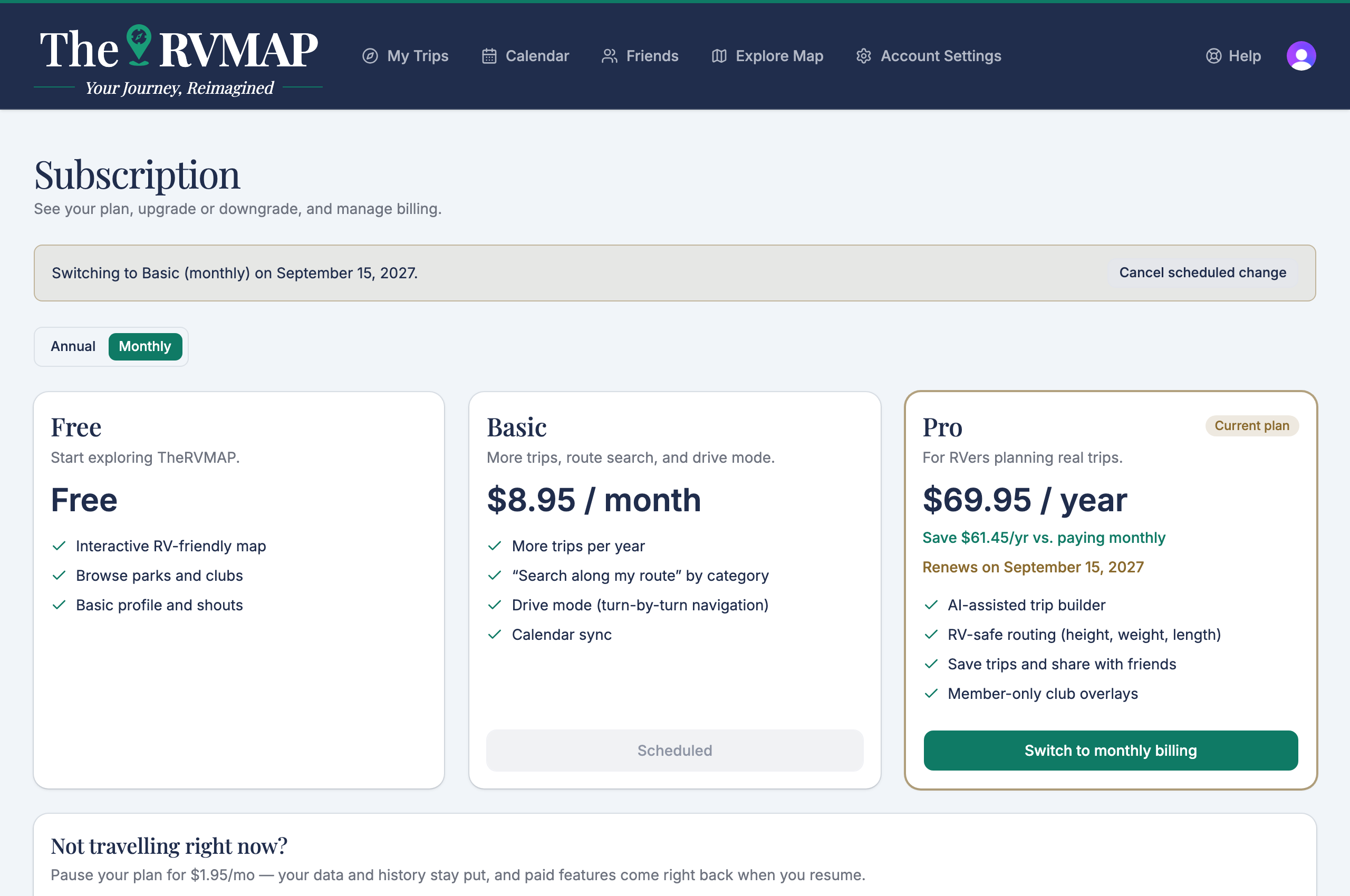
Switching from monthly to annual moves your renewal date
This one surprises people, so here it is plainly: switching from monthly to annual moves your renewal date, because a new yearly period starts on the day you switch. A same-period upgrade, by contrast, does not move your renewal date.
One scheduled change at a time
You can only have one thing scheduled at a time. A pending plan change and a pending pause cannot both be set. If you want to schedule one, clear the other first.
Related
- Which plan is right for you
- Subscribing or upgrading
- Pausing and resuming your subscription
- Billing questions we get most often
Was this article helpful?
That’s Great!
Thank you for your feedback
Sorry! We couldn't be helpful
Thank you for your feedback
Feedback sent
We appreciate your effort and will try to fix the article